Client2Door Developer Guide
Setting up, getting started
Refer to the guide Setting up and getting started.
Design
Architecture
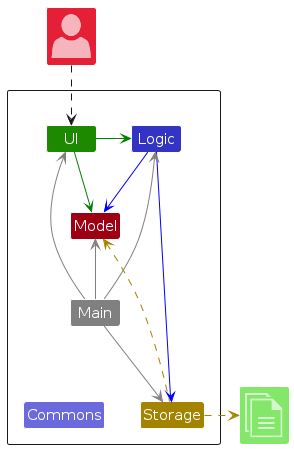
The Architecture Diagram given above explains the high-level design of the App.
Given below is a quick overview of main components and how they interact with each other.
Main components of the architecture
Main (consisting of classes Main and MainApp) is in charge of the app launch and shut down.
- At app launch, it initializes the other components in the correct sequence, and connects them up with each other.
- At shut down, it shuts down the other components and invokes cleanup methods where necessary.
The bulk of the app's work is done by the following four components:
UI: The UI of the App.Logic: The command executor.Model: Holds the data of the App in memory.Storage: Reads data from, and writes data to, the hard disk.
Commons represents a collection of classes used by multiple other components.
How the architecture components interact with each other
The Sequence Diagram below shows how the components interact with each other for the scenario where the user issues the command delete 1.
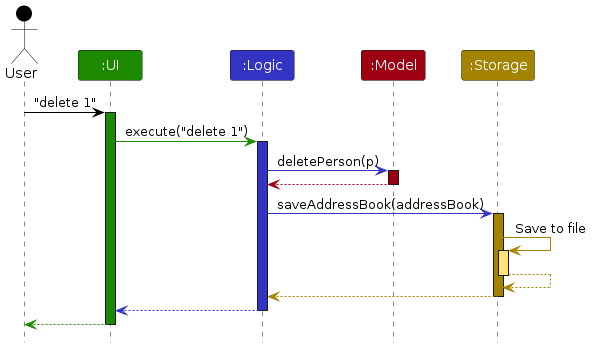
Each of the four main components (also shown in the diagram above),
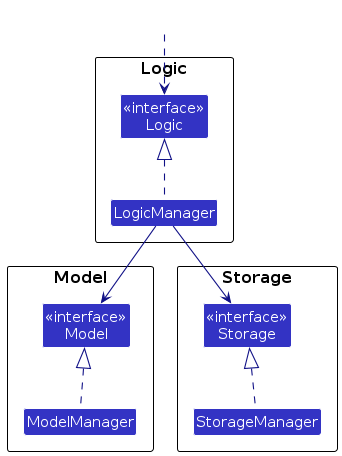
- defines its API in an
interfacewith the same name as the Component. - implements its functionality using a concrete
{Component Name}Managerclass which follows the corresponding APIinterfacementioned in the previous point.
For example, the Logic component defines its API in the Logic.java interface and implements its functionality using the LogicManager.java class which follows the Logic interface. Other components interact with a given component through its interface rather than the concrete class (reason: to prevent outside component's being coupled to the implementation of a component), as illustrated in the (partial) class diagram below.
The sections below give more details of each component.
UI component
The API of this component is specified in Ui.java
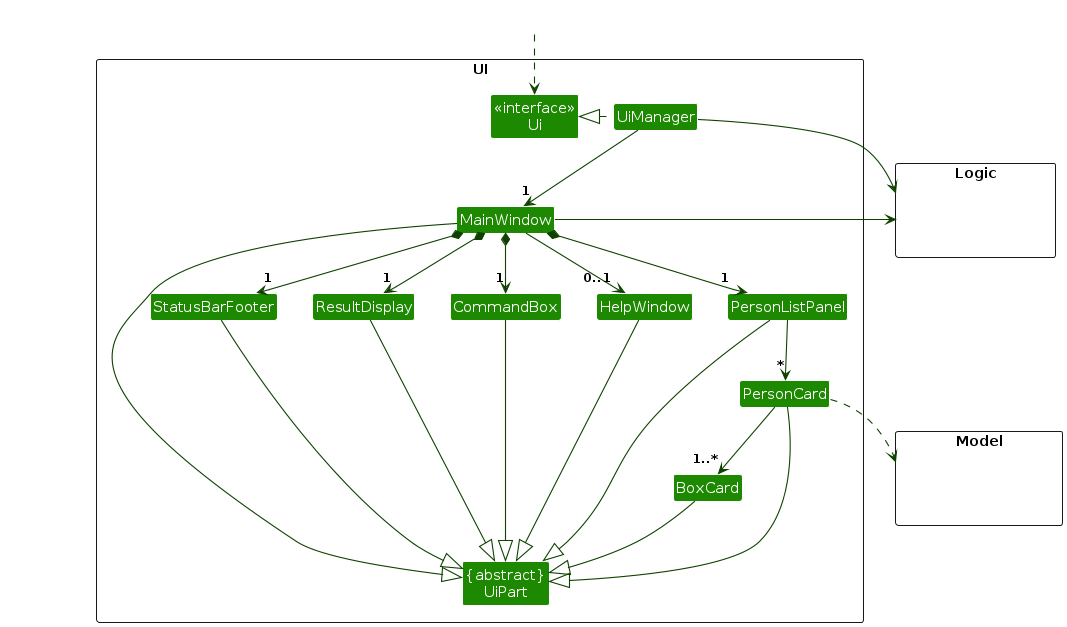
The UI consists of a MainWindow that is made up of parts e.g.CommandBox, ResultDisplay, PersonListPanel, StatusBarFooter etc. All these, including the MainWindow, inherit from the abstract UiPart class which captures the commonalities between classes that represent parts of the visible GUI.
The UI component uses the JavaFx UI framework. The layout of these UI parts are defined in matching .fxml files that are in the src/main/resources/view folder. For example, the layout of the MainWindow is specified in MainWindow.fxml
The UI component,
- executes user commands using the
Logiccomponent. - listens for changes to
Modeldata so that the UI can be updated with the modified data. - keeps a reference to the
Logiccomponent, because theUIrelies on theLogicto execute commands. - depends on some classes in the
Modelcomponent, as it displaysPersonobject residing in theModel.
Logic component
API : Logic.java
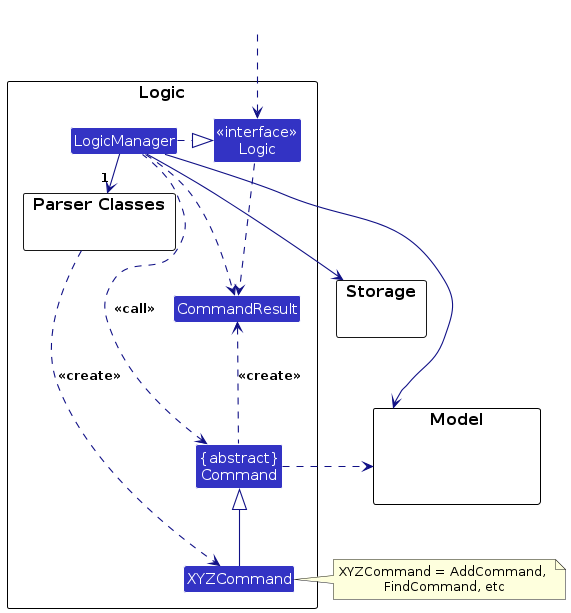
Here's a (partial) class diagram of the Logic component:
The sequence diagram below illustrates the interactions within the Logic component, taking execute("delete 1") API call as an example.
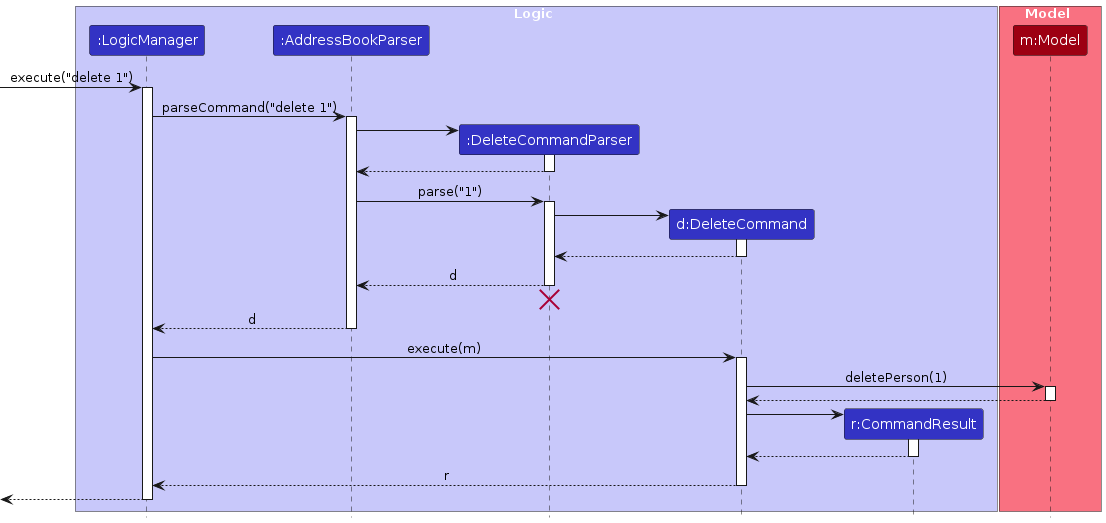
Note: The lifeline for DeleteCommandParser should end at the destroy marker (X) but due to a limitation of PlantUML, the lifeline continues till the end of diagram.
How the Logic component works:
- When
Logicis called upon to execute a command, it is passed to anAddressBookParserobject which in turn creates a parser that matches the command (e.g.,DeleteCommandParser) and uses it to parse the command. - This results in a
Commandobject (more precisely, an object of one of its subclasses e.g.,DeleteCommand) which is executed by theLogicManager. - The command can communicate with the
Modelwhen it is executed (e.g. to delete a person).
Note that although this is shown as a single step in the diagram above (for simplicity), in the code it can take several interactions (between the command object and theModel) to achieve. - The result of the command execution is encapsulated as a
CommandResultobject which is returned back fromLogic.
Here are the other classes in Logic (omitted from the class diagram above) that are used for parsing a user command:
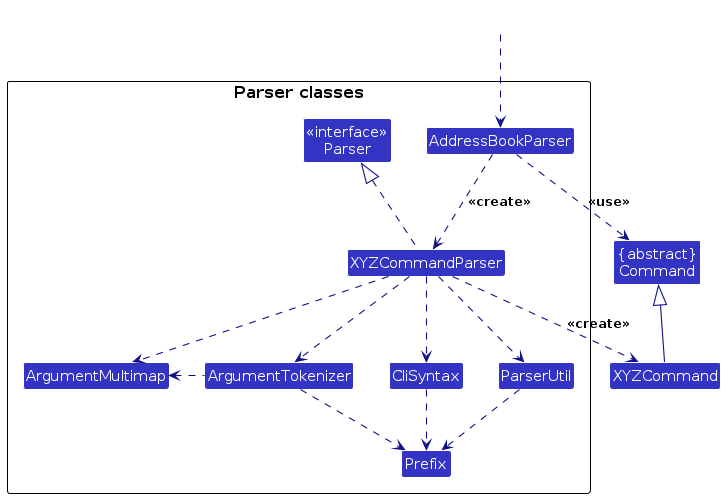
How the parsing works:
- When called upon to parse a user command, the
AddressBookParserclass creates anXYZCommandParser(XYZis a placeholder for the specific command name e.g.,AddCommandParser) which uses the other classes shown above to parse the user command and create aXYZCommandobject (e.g.,AddCommand) which theAddressBookParserreturns back as aCommandobject. - All
XYZCommandParserclasses (e.g.,AddCommandParser,DeleteCommandParser, ...) inherit from theParserinterface so that they can be treated similarly where possible e.g, during testing.
Model component
API : Model.java
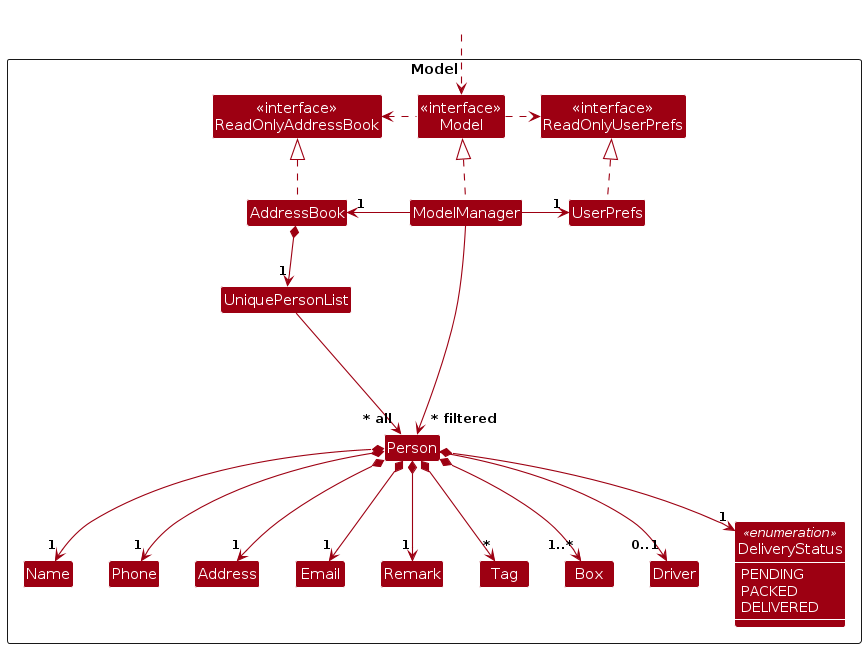
The Model component,
- stores the address book data i.e., all
Personobjects (which are contained in aUniquePersonListobject). - stores the currently 'selected'
Personobjects (e.g., results of a search query) as a separate filtered list which is exposed to outsiders as an unmodifiableObservableList<Person>that can be 'observed' e.g. the UI can be bound to this list so that the UI automatically updates when the data in the list change. - stores a
UserPrefobject that represents the user’s preferences. This is exposed to the outside as aReadOnlyUserPrefobjects. - does not depend on any of the other three components (as the
Modelrepresents data entities of the domain, they should make sense on their own without depending on other components)
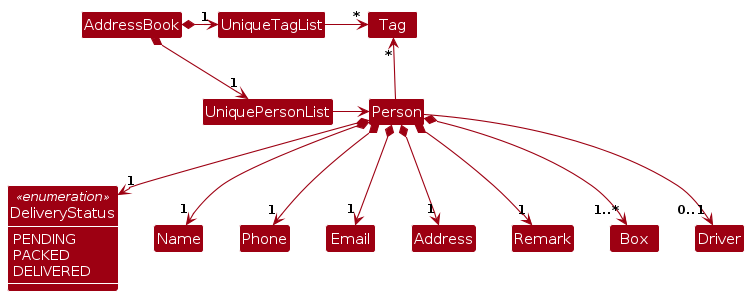
Note: An alternative (arguably, a more OOP) model is given below. It has a Tag list in the AddressBook, which Person references. This allows AddressBook to only require one Tag object per unique tag, instead of each Person needing their own Tag objects.
Storage component
API : Storage.java
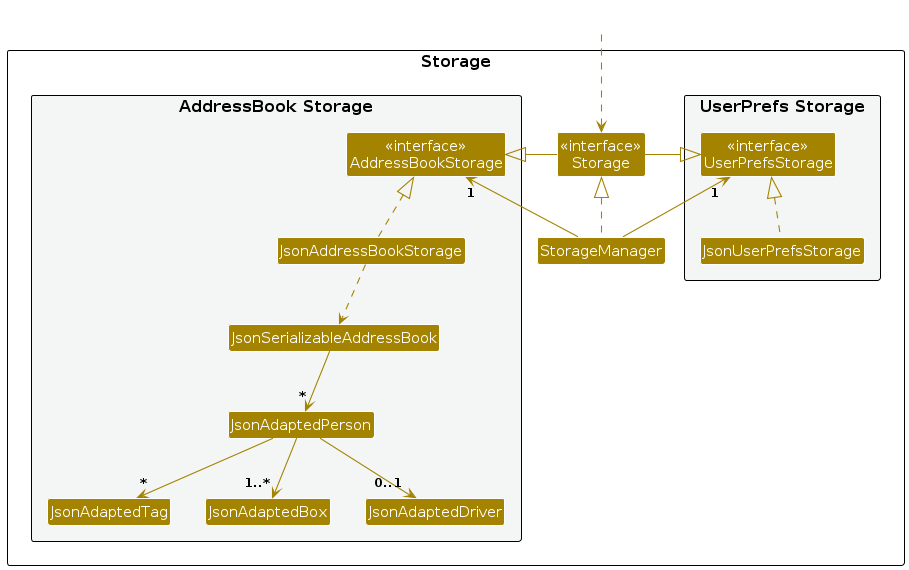
The Storage component,
- can save both address book data and user preference data in JSON format, and read them back into corresponding objects.
- inherits from both
AddressBookStorageandUserPrefsStorage, which means it can be treated as either one (if only the functionality of only one is needed). - depends on some classes in the
Modelcomponent (because theStoragecomponent's job is to save/retrieve objects that belong to theModel) - serializes driver data as part of each person's JSON representation, using
JsonAdaptedDriverto convert between theDrivermodel object and its JSON form.
Common classes
Classes used by multiple components are in the seedu.address.commons package.
Implementation
This section describes some noteworthy details on how certain features are implemented.
Assign drivers feature
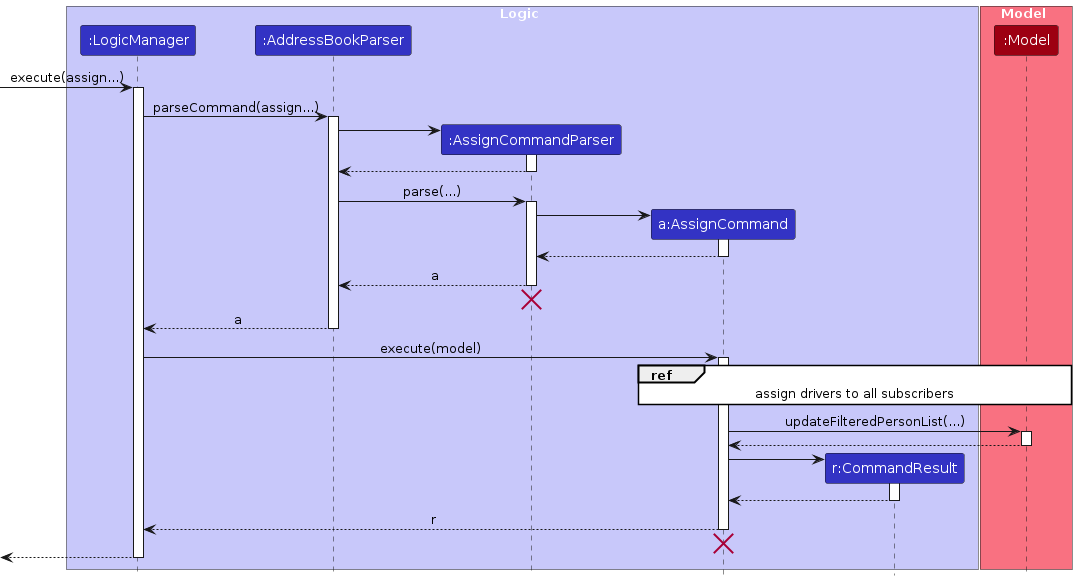
The following sequence diagram shows how an assign operation goes through the Logic component:
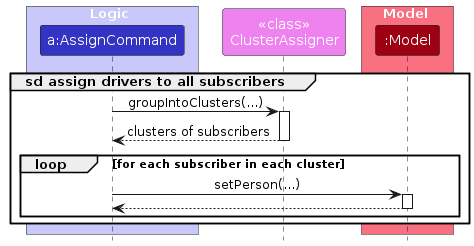
Separate sequence diagram showing how the assignment of all subscribers:
The following class diagram shows the structure of the clustering logic:
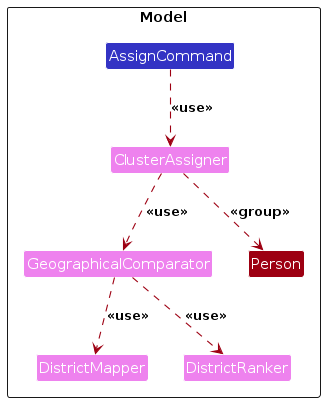
The AssignCommand calls ClusterAssigner#groupIntoClusters() to get the partitioned list of lists of Persons. It will then call Model#setPerson() to edit all the Persons in the address book. The clustering logic uses GeographicalComparator, DistrictMapper and DistrictRanker to sort subscribers geographically from west to east before partitioning.
During validation, Client2Door treats two drivers as duplicates if either their names match or their phone numbers match. This business-level identity check is separate from Driver#equals(), which remains strict and requires both name and phone number to match.
Delete box feature
The following sequence diagram shows how a deleteBox operation goes through the Logic component:
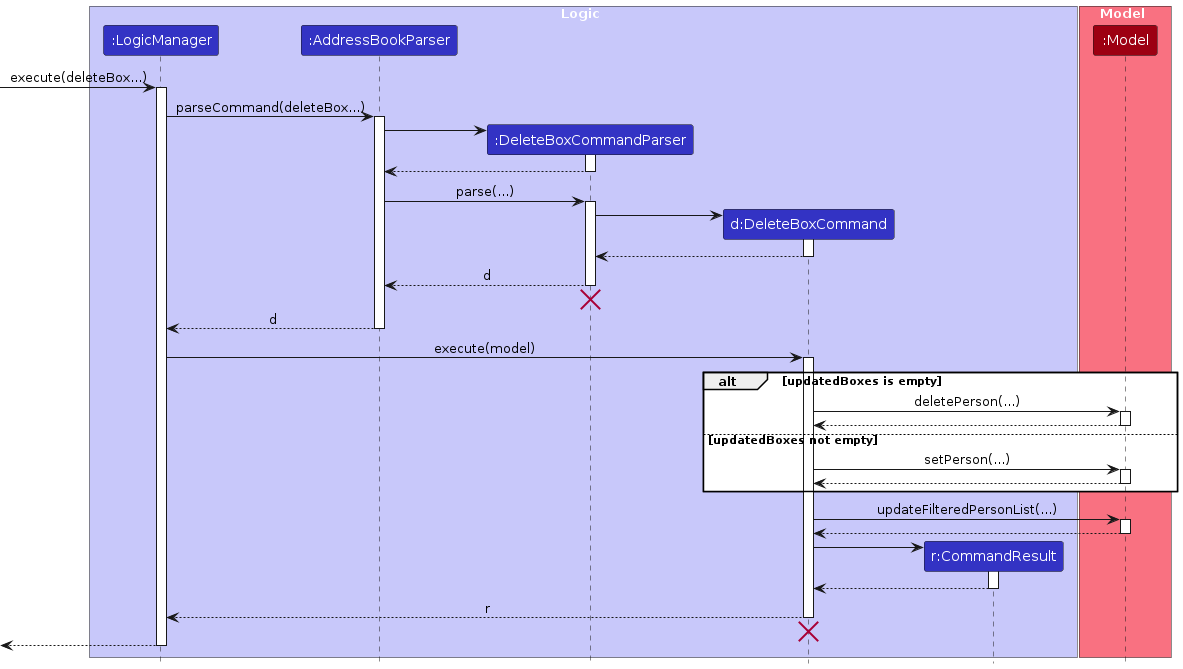
The following activity diagram summarizes what happens when a user executes a deletebox command:
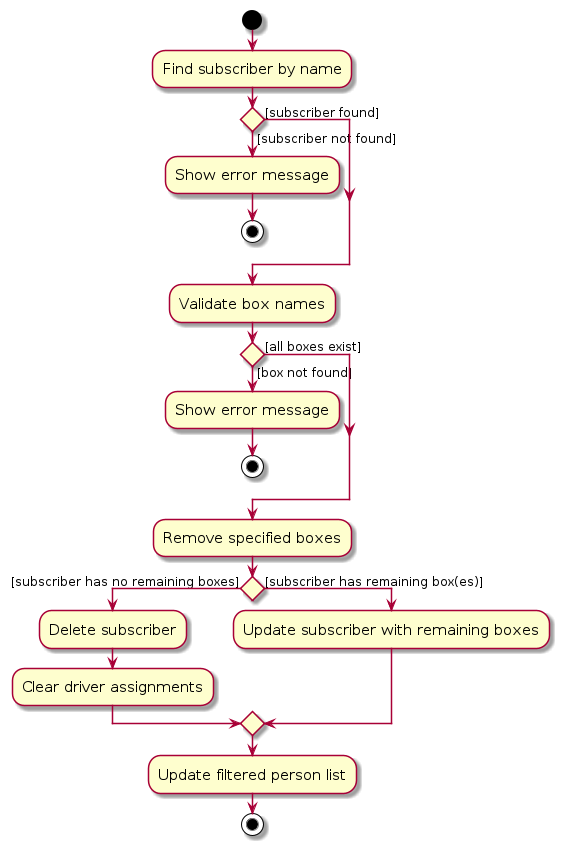
A notable behaviour of DeleteBoxCommand is that if a subscriber has no remaining boxes after deletion, the subscriber is automatically deleted from the address book as well. Driver assignments are also cleared in this case.
Filter feature
FilterCommand supports two filtering modes: filtering by box name and filtering by assigned driver name. The mode is determined at parse time — if the d/ prefix is provided, a DriverAssignedToPersonPredicate is used; otherwise, a PersonHasBoxPredicate is used. Both are case-insensitive.
Export feature
The ExportCommand generates an HTML file containing the current delivery assignments, grouped by driver.
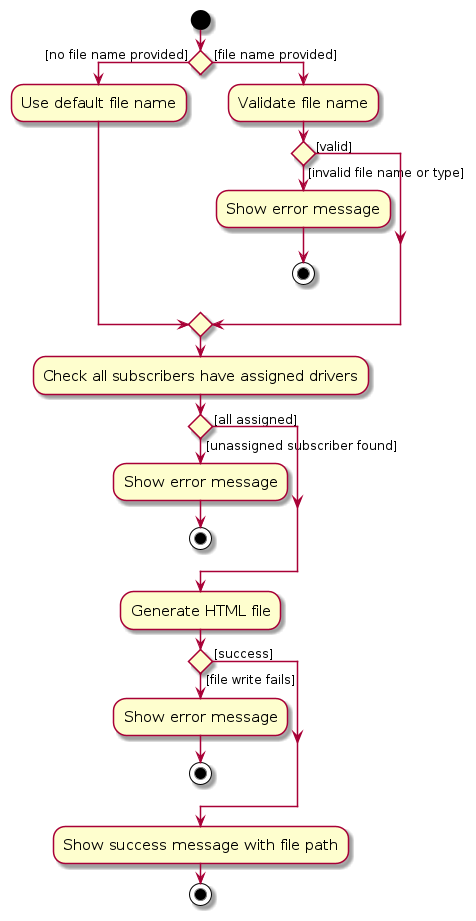
A key constraint is that all subscribers must have an assigned driver before export can proceed. If any subscriber is missing a driver, the command fails with an error.
The following activity diagram summarizes what happens when a user executes an export command:
[Proposed] Undo/redo feature
Proposed Implementation
The proposed undo/redo mechanism is facilitated by VersionedAddressBook. It extends AddressBook with an undo/redo history, stored internally as an addressBookStateList and currentStatePointer. Additionally, it implements the following operations:
VersionedAddressBook#commit()— Saves the current address book state in its history.VersionedAddressBook#undo()— Restores the previous address book state from its history.VersionedAddressBook#redo()— Restores a previously undone address book state from its history.
These operations are exposed in the Model interface as Model#commitAddressBook(), Model#undoAddressBook() and Model#redoAddressBook() respectively.
Given below is an example usage scenario and how the undo/redo mechanism behaves at each step.
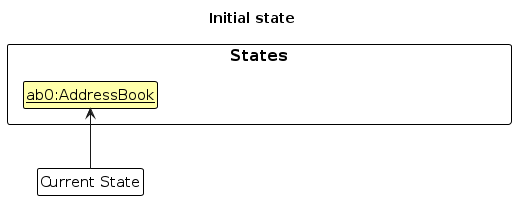
Step 1. The user launches the application for the first time. The VersionedAddressBook will be initialized with the initial address book state, and the currentStatePointer pointing to that single address book state.
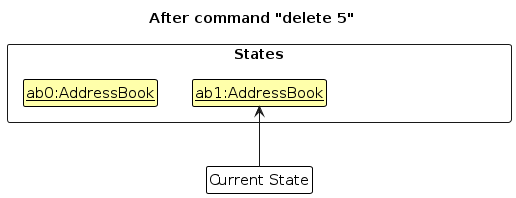
Step 2. The user executes delete 5 command to delete the 5th person in the address book. The delete command calls Model#commitAddressBook(), causing the modified state of the address book after the delete 5 command executes to be saved in the addressBookStateList, and the currentStatePointer is shifted to the newly inserted address book state.
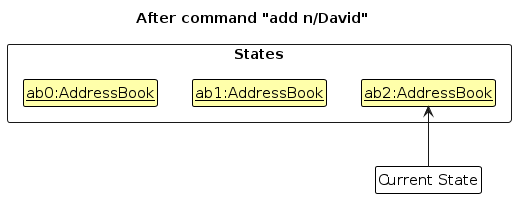
Step 3. The user executes add n/David … to add a new person. The add command also calls Model#commitAddressBook(), causing another modified address book state to be saved into the addressBookStateList.
Note: If a command fails its execution, it will not call Model#commitAddressBook(), so the address book state will not be saved into the addressBookStateList.
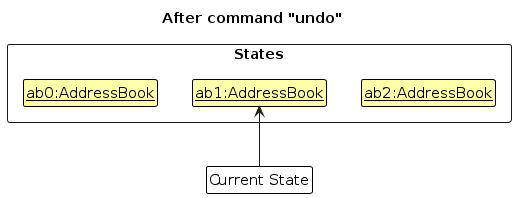
Step 4. The user now decides that adding the person was a mistake, and decides to undo that action by executing the undo command. The undo command will call Model#undoAddressBook(), which will shift the currentStatePointer once to the left, pointing it to the previous address book state, and restores the address book to that state.
Note: If the currentStatePointer is at index 0, pointing to the initial AddressBook state, then there are no previous AddressBook states to restore. The undo command uses Model#canUndoAddressBook() to check if this is the case. If so, it will return an error to the user rather
than attempting to perform the undo.
The following sequence diagram shows how an undo operation goes through the Logic component:
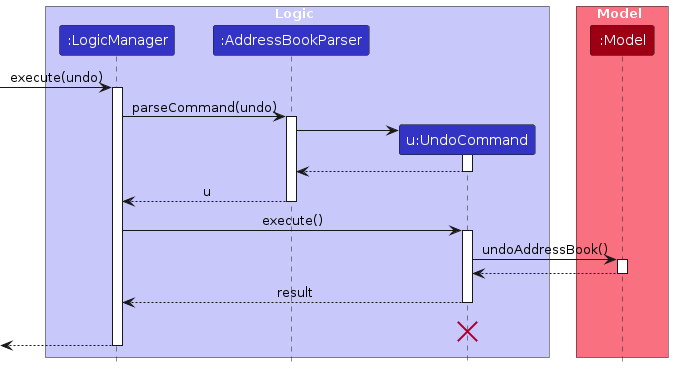
Note: The lifeline for UndoCommand should end at the destroy marker (X) but due to a limitation of PlantUML, the lifeline reaches the end of diagram.
Similarly, how an undo operation goes through the Model component is shown below:
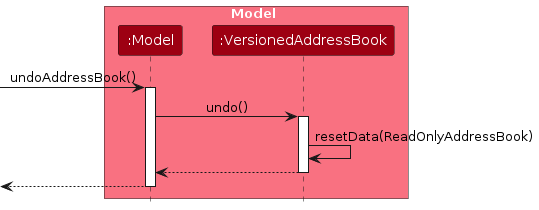
The redo command does the opposite — it calls Model#redoAddressBook(), which shifts the currentStatePointer once to the right, pointing to the previously undone state, and restores the address book to that state.
Note: If the currentStatePointer is at index addressBookStateList.size() - 1, pointing to the latest address book state, then there are no undone AddressBook states to restore. The redo command uses Model#canRedoAddressBook() to check if this is the case. If so, it will return an error to the user rather than attempting to perform the redo.
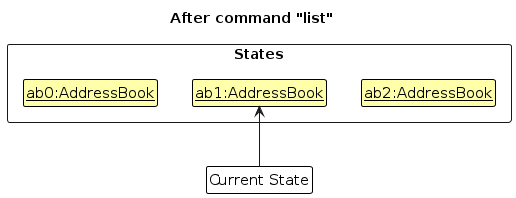
Step 5. The user then decides to execute the command list. Commands that do not modify the address book, such as list, will usually not call Model#commitAddressBook(), Model#undoAddressBook() or Model#redoAddressBook(). Thus, the addressBookStateList remains unchanged.
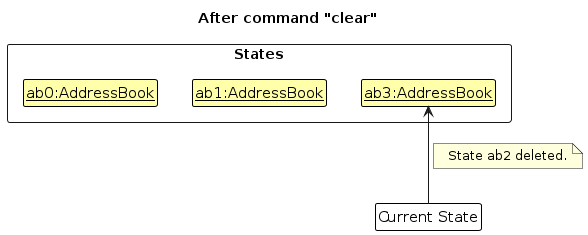
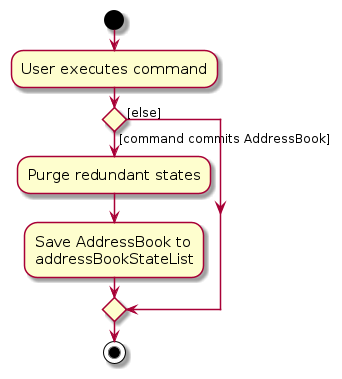
Step 6. The user executes clear, which calls Model#commitAddressBook(). Since the currentStatePointer is not pointing at the end of the addressBookStateList, all address book states after the currentStatePointer will be purged. Reason: It no longer makes sense to redo the add n/David … command. This is the behavior that most modern desktop applications follow.
The following activity diagram summarizes what happens when a user executes a new command:
Design considerations:
Aspect: How undo & redo executes:
Alternative 1 (current choice): Saves the entire address book.
- Pros: Easy to implement.
- Cons: May have performance issues in terms of memory usage.
Alternative 2: Individual command knows how to undo/redo by itself.
- Pros: Will use less memory (e.g. for
delete, just save the person being deleted). - Cons: We must ensure that the implementation of each individual command are correct.
- Pros: Will use less memory (e.g. for
Documentation, logging, testing, configuration, dev-ops
Appendix: Requirements
Product scope
Target user profile:
- small delivery startup owners (e.g., subscription box services) in Singapore
- have limited manpower for admin work
- have limited road experience and are unfamiliar with local addresses
- can type fast and prefer typing to mouse interactions
- are comfortable using CLI apps
Value proposition (Client2Door):
- organizes customer contact and delivery details in one place
- provides a CLI-based alternative to GUI spreadsheets
- enables faster delivery tracking via quick access to client details
- helps optimize delivery routes by clustering addresses
User stories
Priorities: High (must have) - * * *, Medium (nice to have) - * *, Low (unlikely to have) - *
| Priority | As a … | I want to … | So that I can… |
|---|---|---|---|
* * * | unfamiliar user | see usage instructions | refer to instructions when I forget how to use Client2Door |
* * * | unfamiliar user | access a help page of commands (user guide) | know what each command does and how to use them |
* * * | small business owner | add a new customer with contact details, address, and subscription information | manage deliveries and customer communication |
* * * | small business owner | view current subscribers for the month | plan monthly deliveries efficiently |
* * * | small business owner | search customers by name/phone/address keyword | find details quickly during calls or delivery attempts |
* * * | small business owner | view a customer's delivery address and details | deliver orders accurately |
* * * | driver with limited road experience | open directions (Google Maps link) to my next location | reach the next stop efficiently |
* * * | small business owner | check off customers who have received their monthly box | track completed deliveries for the month |
* * * | small business owner | delete customers with expired subscriptions | keep the customer list updated each month |
* * * | CLI-lover | use keyboard commands as much as possible | reduce time wasted navigating with a mouse |
* * | new business owner | access the app with a password | protect client confidentiality and trust |
* * | small business owner | edit a customer delivery entry | correct mistakes and handle last-minute changes |
* * | small business owner | add remarks to a delivery (e.g. reason for failed delivery) | avoid repeating the same mistakes |
* * | small business owner | import and export customers and order details | avoid retyping existing data |
* * * | small business owner | assign drivers to subscribers for a delivery run | distribute deliveries across my drivers efficiently |
* * * | small business owner | export driver delivery assignments to a shareable file | send each driver their delivery list without manual copying |
* * * | small business owner | add, edit, and delete subscription boxes for a subscriber | keep each subscriber's order details accurate and up to date |
* * * | small business owner | filter subscribers by box type or assigned driver | quickly review which subscribers belong to a specific group |
* * | small business owner | group customers staying in the same block/estate/area | complete all deliveries in that area without revisiting |
* * | small business owner who prefers commands over a graphical interface | generate a route grouped by location using a single command | minimize repeated trips easily |
* * | small business owner | highlight blatantly erroneous entries | reduce administrative workload (data checking) |
* | small business owner | hide private customer details | minimize chance of someone else seeing them by accident |
* | long-time user | delete specific addresses (subscribers) | keep subscribers viewable while removing non-subscribers |
* | long-time user | view a decent-looking UI | make everyday usage less mundane while keeping information viewable |
Use cases
(For all use cases below, the System is the Client2Door and the Actor is the Startup Owner, unless specified otherwise)
Use case: UC01 — Add a subscriber
MSS
Startup owner requests to add a subscriber.
Client2Door adds the subscriber to the active subscriber list.
Client2Door displays a success message and updated subscriber list.
Use case ends.
Extensions
1a. Startup owner enters an invalid command word (e.g., typo, misspelling).
1a1. Client2Door shows an error message indicating the command is invalid.
Use case ends.
1b. Startup owner enters an invalid command format (e.g., parameters issue).
1b1. Client2Door shows an error message indicating the format is invalid.
Use case ends.
1c. Startup owner enters an invalid phone number (e.g., incorrect number of digits).
1c1. Client2Door shows invalid phone number error message.
Use case ends.
1d. Startup owner enters an invalid email address.
1d1. Client2Door shows invalid email error message.
Use case ends.
1e. Startup owner enters an invalid postal code.
1e1. Client2Door shows invalid postal code error message.
Use case ends.
1f. Startup owner adds a duplicate subscriber.
1f1. Client2Door shows duplicate subscriber error message.
Use case ends.
Use case: UC02 — Delete a subscriber
MSS
Startup owner requests to delete a subscriber at specific index in list.
Client2Door deletes the specified subscriber.
Client2Door displays success message and the updated subscriber list.
Use case ends.
Extensions
1a. Startup owner enters an invalid index.
1a1. Client2Door shows invalid index error message.
Use case ends.
1b. Startup owner enters an invalid command format (e.g., parameters issue).
1b1. Client2Door shows an error message indicating the format is invalid.
Use case ends.
Use case: UC03 — List subscribers
MSS
Startup owner requests to list all active subscribers.
Client2Door displays all subscribers and all stored details.
Use case ends.
Extensions
1a. Startup owner enters an invalid command word (e.g., typo, misspelling).
1a1. Client2Door shows an error message indicating the command is invalid.
Use case ends.
1b. Startup owner enters an invalid command format (e.g., parameters issue).
1b1. Client2Door shows an error message indicating the format is invalid.
Use case ends.
2a. The subscriber list is empty.
2a1. Client2Door displays no subscribers
Use case ends.
Use case: UC04 — Assign drivers to subscribers
MSS
Startup owner requests to assign drivers to subscribers.
Startup owner enters the assign command with one or more drivers, each with a name and phone number.
Client2Door validates the command and driver details.
Client2Door groups the current subscribers into clusters, with each cluster being assigned a driver.
Client2Door displays a success message and updated subscriber list.
Use case ends.
Extensions
1a. Startup owner enters an invalid command word (e.g., typo, misspelling).
1a1. Client2Door shows an error message indicating the command is invalid.
Use case ends.
2a. Startup owner enters an invalid command format (e.g., missing or malformed parameters).
2a1. Client2Door shows an error message indicating the format is invalid.
Use case ends.
2b. Startup owner enters an invalid driver name.
2b1. Client2Door shows an invalid name error message.
Use case ends.
2c. Startup owner enters an invalid driver phone number (e.g., incorrect number of digits).
2c1. Client2Door shows an invalid phone number error message.
Use case ends.
2d. Startup owner specifies duplicate drivers (i.e. two drivers share the same name or the same phone number).
2d1. Client2Door shows a duplicate driver error message.
Use case ends.
4a. Client2Door is unable to complete the subscriber clustering or assignment process.
4a1. Client2Door shows a failure message indicating that driver assignment failed.
Use case ends.
Use case: UC05 — View help
MSS
Startup owner requests to view the help information.
Client2Door displays the help information.
Use case ends.
Extensions
1a. Startup owner enters an invalid command word (e.g., typo, misspelling).
1a1. Client2Door shows an error message indicating the command is invalid.
Use case ends.
Use case: UC06 — Edit a subscriber
MSS
Startup owner requests to edit a subscriber.
Startup owner specifies the subscriber with the updated field(s).
Client2Door updates the subscriber details.
Client2Door displays a success message and updated subscriber list.
Use case ends.
Extensions
2a. Startup owner enters an invalid command format.
2a1. Client2Door shows an error message indicating the format is invalid.
Use case ends.
2b. Startup owner provides invalid updated field value(s).
2b1. Client2Door shows an error message indicating the invalid field value(s).
Use case ends.
2c. Startup owner does not provide any field to update.
2c1. Client2Door shows an error message indicating that at least one field must be provided.
Use case ends.
Use case: UC07 — Update a subscriber remark
MSS
Startup owner requests to update a subscriber's remark.
Startup owner specifies the subscriber and the new remark.
Client2Door updates the subscriber's remark.
Client2Door displays a success message and updated subscriber list.
Use case ends.
Extensions
2a. Startup owner enters an invalid command format.
2a1. Client2Door shows an error message indicating the format is invalid.
Use case ends.
2b. Startup owner enters an invalid remark (e.g., too long of a remark)
2b1. Client2Door shows an error message indicating the remark format is invalid.
Use case ends.
Use case: UC08 — Find subscribers
MSS
Startup owner requests to find subscribers by keyword.
Startup owner provides one or more keywords.
Client2Door searches for matching subscribers.
Client2Door displays the matching subscribers.
Use case ends.
Extensions
2a. Startup owner enters an invalid command format.
2a1. Client2Door shows an error message indicating the format is invalid.
Use case ends.
3a. No subscribers match the keywords.
3a1. Client2Door shows an empty result list.
Use case ends.
Use case: UC09 — Update delivery status
MSS
Startup owner requests to update a subscriber's delivery status.
Startup owner specifies the subscriber and the new status.
Client2Door updates the subscriber's delivery status.
Client2Door displays a success message and updated subscriber list.
Use case ends.
Extensions
2a. Startup owner enters an invalid command format.
2a1. Client2Door shows an error message indicating the format is invalid.
Use case ends.
2b. Startup owner provides an invalid delivery status.
2b1. Client2Door shows an error message indicating the status is invalid.
Use case ends.
Use case: UC10 — Filter subscribers
MSS
Startup owner requests to filter subscribers.
Startup owner provides one or more filter criteria.
Client2Door filters the subscriber list.
Client2Door displays the matching subscribers.
Use case ends.
Extensions
2a. Startup owner enters an invalid command format.
2a1. Client2Door shows an error message indicating the format is invalid.
Use case ends.
3a. No subscribers match the filter criteria.
3a1. Client2Door shows an empty result list.
Use case ends.
Use case: UC11 — Add box subscriptions to a subscriber
MSS
Startup owner requests to add one or more box subscriptions to a subscriber.
Startup owner specifies the subscriber and box subscription detail(s).
Client2Door adds the box subscription(s) to the specified subscriber.
Client2Door displays a success message and updated subscriber list.
Use case ends.
Extensions
2a. Startup owner enters an invalid command format.
2a1. Client2Door shows an error message indicating the format is invalid.
Use case ends.
2b. Startup owner specifies an invalid subscriber.
2b1. Client2Door shows an error message indicating the subscriber cannot be found.
Use case ends.
2c. Startup owner provides invalid box subscription detail(s).
2c1. Client2Door shows an error message indicating the box subscription detail(s) are invalid.
Use case ends.
Use case: UC12 — Edit a box subscription
MSS
Startup owner requests to edit a subscriber's box subscription.
Startup owner specifics the box and its updated field(s).
Client2Door updates the box subscription.
Client2Door displays a success message and updated subscriber list.
Use case ends.
Extensions
2a. Startup owner enters an invalid command format.
2a1. Client2Door shows an error message indicating the format is invalid.
Use case ends.
2b. Startup owner specifies an invalid box.
2b1. Client2Door shows an error message indicating the box cannot be found.
Use case ends.
2c. Startup owner does not provide any field to update.
2c1. Client2Door shows an error message indicating that at least one field must be provided.
Use case ends.
Use case: UC13 — Delete box subscriptions from a subscriber
MSS
Startup owner requests to delete one or more box subscriptions from a subscriber.
Startup owner specifies the box subscription(s) to delete.
Client2Door deletes the specified box subscription(s).
Client2Door displays a success message and updated subscriber list.
Use case ends.
Extensions
2a. Startup owner enters an invalid command format.
2a1. Client2Door shows an error message indicating the format is invalid.
Use case ends.
2b. Startup owner specifies a box that does not exist.
2b1. Client2Door shows an error message indicating the box cannot be found.
Use case ends.
3a. The deleted box subscription(s) were the subscriber's last remaining box subscription(s).
3a1. Client2Door deletes the subscriber from the active subscriber list.
Use case ends.
Use case: UC14 — Export delivery assignments
MSS
Startup owner requests to export delivery assignments.
Startup owner optionally provides a file path.
Client2Door generates the export file.
Client2Door displays a success message indicating the export location.
Use case ends.
Extensions
2a. Startup owner enters an invalid command format.
2a1. Client2Door shows an error message indicating the format is invalid.
Use case ends.
3a. There are no delivery assignments to export.
3a1. Client2Door shows an error message indicating that export cannot be performed.
Use case ends.
3b. Client2Door is unable to generate or save the export file.
3b1. Client2Door shows an error message indicating that export failed.
Use case ends.
Use case: UC15 — Import subscribers from CSV
MSS
Startup owner requests to import subscribers from a CSV file.
Startup owner provides a CSV file.
Client2Door reads the CSV file and imports valid subscribers.
Client2Door displays a success message and updated subscriber list.
Use case ends.
Extensions
2a. Startup owner enters an invalid command format.
2a1. Client2Door shows an error message indicating the format is invalid.
Use case ends.
2b. Startup owner provides an invalid file.
2b1. Client2Door shows an error message indicating the file is invalid.
Use case ends.
3a. The CSV file cannot be found.
3a1. Client2Door shows an error message indicating that the file cannot be found.
Use case ends.
3b. The CSV file contains invalid or duplicate rows.
3b1. Client2Door skips the invalid or duplicate rows and reports them.
Use case ends.
3c. No valid subscribers can be imported from the CSV file.
3c1. Client2Door shows a message indicating that no subscribers were imported.
Use case ends.
Use case: UC16 — Clear all subscribers
MSS
Startup owner requests to clear all subscribers.
Client2Door removes all subscribers from the active subscriber list.
Client2Door displays a success message and an empty subscriber list.
Use case ends.
Extensions
1a. Startup owner enters an invalid command word (e.g., typo, misspelling).
1a1. Client2Door shows an error message indicating the command is invalid.
Use case ends.
1b. Startup owner enters an invalid command format.
1b1. Client2Door shows an error message indicating the format is invalid.
Use case ends.
Non-Functional Requirements
Environment Requirements
- The system should work on any mainstream OS with Java
17or above installed. - The system should work without requiring an installer.
- The system should not depend on any remote server maintained by the development team.
Performance & Capacity Requirements
- The system should manage up to 1000 persons without noticeable performance degradation.
- The system should respond to user commands within 1 second when managing up to 1000 persons.
Usability & Accessibility Requirements
- Users should be able to complete most tasks faster using commands than using a mouse.
- New users should be able to perform basic commands after reading the User Guide without external assistance.
- The GUI should display correctly without layout distortion at 1920×1080 (scaling 100 - 125%), and remain fully functional at 1280×720 (scaling up to 150%).
Data Requirements
- The system should support persistent local storage of user data.
- The system should restore previously saved data upon restart.
- The system should prevent corruption of stored data during unexpected shutdown.
- The system should save data automatically after each modifying command.
Reliability & Error Handling
- The system should operate continuously without failure during normal usage sessions.
- Invalid commands should not cause the system to crash.
- The system should display informative error messages for invalid user inputs.
- The system should handle unexpected or malformed input gracefully.
Maintainability & Extensibility
- The codebase should follow standard Java coding conventions.
- The system should be modular to allow future feature extensions.
Security & Privacy
- User data should be stored locally and not transmitted externally without user action.
Documentation
- A User Guide describing all commands should be provided.
- A Developer Guide describing the system architecture should be provided to facilitate maintenance.
Glossary
Box: A physical subscription box to be delivered to a subscriber.
CLI (Command Line Interface): A text-based interface where users interact with the system by typing commands instead of using graphical controls.
Cluster: A group of subscribers geographically grouped together and assigned to a single driver for efficient delivery.
Delivery status: The current state of a subscriber's delivery, which can be
PENDING,PACKED, orDELIVERED.Driver: A delivery driver assigned to a cluster of subscribers for a delivery session.
Mainstream OS: A widely used operating system such as Windows, macOS, or Linux.
Postal code: A 6-digit Singapore postal code (e.g.,
521123) used to identify a subscriber's delivery address.Startup owner: The primary user of the system, typically a small business owner managing customer subscriptions and deliveries.
Subscriber: A customer with an active subscription who is expected to receive recurring deliveries.
Subscription information: Details of a subscriber's box subscription, consisting of a box name and the number of months subscribed.
Appendix: Instructions for manual testing
Given below are instructions to test the app manually.
Note: These instructions only provide a starting point for testers to work on; testers are expected to do more exploratory testing.
Launch and shutdown
Initial launch
- Download the jar file and move/copy into an empty folder
Open a terminal and navigate to the folder using
cd. For example:
Windows (Command Prompt):cd C:\MyBusiness\Client2Door java -jar Client2Door.jarMac / Linux (Terminal):
cd ~/Client2Door java -jar Client2Door.jar- Run the app:
java -jar Client2Door.jar
NOTE: The window size may not be optimum.
- Run the app:
Saving window preferences
Resize the window to an optimum size. Move the window to a different location. Close the window.
Re-launch the app the same way as the first time.
Expected: The most recent window size and location is retained.
Adding a subscriber
Adding a subscriber while all subscribers are being shown
Prerequisites: List all subscribers using the
listcommand. Ensure there is no existing subscriber with the same details.Test case:
add n/John Doe p/91234567 e/johndoe@email.com a/Blk 123 Tampines St 11 #05-67 Singapore 521123 b/box-1:2
Expected: New subscriber is added to the list. Details of the added subscriber shown in the status message.Test case:
add n/John Doe p/91234567 e/johndoe@email.com a/Blk 123 Tampines St 11 #05-67 Singapore 521123 b/box-1:2
Expected: No subscriber is added as there is a duplicate subscriber. Error details shown in the status message. State of address book remains the same.Other incorrect add commands to try:
add,add n/John Doe,add n/John Doe p/91234567 e/invalid-email a/Blk 123 Tampines St 11 #05-67 Singapore 521123 b/box-1:2,add n/John Doe p/91234567 e/johndoe@email.com a/No postal code b/box-1:2
Expected: Similar to previous.
Editing a subscriber
Editing a subscriber while all subscribers are being shown
Prerequisites: List all subscribers using the
listcommand. At least one subscriber in the list.Test case:
edit 1 p/97777777 e/alexyeoh_new@email.com
Expected: First subscriber is updated with the new phone number and email. Updated details shown in the status message.Test case:
edit 1 r/prefers evening delivery
Expected: First subscriber's remark is updated. Updated details shown in the status message.Test case:
edit 0 p/91234567
Expected: No subscriber is edited. Error details shown in the status message. State of address book remains the same.Other incorrect edit commands to try:
edit,edit 1,edit x p/91234567,edit 1 e/invalid-email,edit 1 a/No postal code
Expected: Similar to previous.
Deleting a subscriber
Deleting a subscriber while all subscribers are being shown
Prerequisites: List all subscribers using the
listcommand. At least one subscriber in the list.Test case:
delete 1
Expected: First contact is deleted from the list. Details of the deleted contact shown in the status message.Test case:
delete 0
Expected: No subscriber is deleted. Error details shown in the status message. State of address book remains the sameOther incorrect delete commands to try:
delete,delete x,...(where x is larger than the list size)
Expected: Similar to previous.
Updating a subscriber's remark
Updating a subscriber's remark while all subscribers are being shown
Prerequisites: List all subscribers using the
listcommand. At least one subscriber in the list.Test case:
remark 1 r/leave at door and ring bell
Expected: First subscriber's remark is updated. Updated details shown in the status message.Test case:
remark 0 r/some remark
Expected: No subscriber is updated. Error details shown in the status message. State of address book remains the same.Other incorrect remark commands to try:
remark 1 no prefix,remark x r/test,remark 1
Expected: Similar to previous.
Adding boxes to a subscriber
Adding one or more boxes to an existing subscriber
Prerequisites: A subscriber named
Alex Yeohexists.Test case:
addbox n/Alex Yeoh b/box-3:4
Expected:box-3is added to Alex Yeoh with the appropriate subscription duration. Updated details shown in the status message.Test case:
addbox n/Alex Yeoh b/box-4:2 b/box-5:2
Expected: Both boxes are added to Alex Yeoh. Updated details shown in the status message.Test case:
addbox n/Unknown Person b/box-1:2
Expected: No box is added. Subscriber not found error shown.Other incorrect addbox commands to try:
addbox,addbox n/Alex Yeoh,addbox n/Alex Yeoh b/box-1,addbox n/Alex Yeoh b/:2,addbox n/Alex Yeoh b/box-1:0
Expected: Similar to previous.
Editing a box
Editing a box belonging to a subscriber
Prerequisites: A subscriber named
Alex Yeohexists with a box namedbox-1.Test case:
editbox n/Alex Yeoh b/box-1 nb/box-2
Expected:box-1under Alex Yeoh is renamed tobox-2. Updated details shown in the status message.Test case:
editbox n/Alex Yeoh b/box-1 ex/3
Expected:box-1under Alex Yeoh has its subscription duration updated. Updated details shown in the status message.Test case:
editbox n/Alex Yeoh b/nosuchbox nb/box-2
Expected: No box is edited. Box not found error shown.Test case:
editbox n/Alex Yeoh b/box-1
Expected: No box is edited. Error details shown in the status message as no editable field is provided.Other incorrect editbox commands to try:
editbox,editbox n/Alex Yeoh,editbox n/Alex Yeoh b/box-1 ex/0,editbox n/Unknown Person b/box-1 nb/box-2
Expected: Similar to previous.
Deleting boxes from a subscriber
Deleting a box from a subscriber with multiple boxes
Prerequisites: A subscriber named
Alex Yeohexists with at least two boxes.Test case:
deletebox n/Alex Yeoh b/box-1
Expected:box-1removed from Alex Yeoh. Success message shown.Test case:
deletebox n/Alex Yeoh b/box-1 b/box-2
Expected: Both boxes removed. If no boxes remain, Alex Yeoh is automatically deleted. Success message indicates subscriber was also deleted.Test case:
deletebox n/Alex Yeoh b/nosuchbox-1
Expected: No change. Box does not exist error shown.Test case:
deletebox n/Unknown Subscriber b/box-1
Expected: No change. Subscriber not found error shown.
Finding subscribers
Finding subscribers by keyword
Prerequisites: List all subscribers using the
listcommand. Ensure there are subscribers with searchable names in the list.Test case:
find Alex
Expected: Only subscribers with name containingAlexare shown. Status message shows the number of persons listed.Test case:
find Alex Bernice
Expected: Subscribers with names containing eitherAlexorBerniceare shown.Test case:
find NoSuchName
Expected: No subscribers are shown. Status message indicates that 0 persons are listed.Other incorrect find commands to try:
find,find @@@
Expected: Similar to previous or format error shown in the status message.
Assigning drivers
Assigning drivers while all subscribers are being shown
Prerequisites: List all subscribers using the
listcommand. Multiple subscribers in the list.Test case:
assign n/David Lim p/91234567 n/Priya Nair p/98765432
Expected: All subscribers are assigned to one of the provided drivers. Updated driver assignments are reflected in the list. Success message shown in the status message.Test case:
assign n/Patrick Loh p/87171717 n/Ali Chow p/88234567
Expected: Updated new driver assignments are reflected in the list. Success message shown in the status message.Possible incorrect assign commands to try:
assign,assign n/David Lim,assign p/91234567,assign n/David Lim p/000,assign n/ p/91234567
Expected: No driver assignments are made. Error details shown in the status message. State of address book remains the same.
Note: if the number of declared drivers exceed the number of subscribers, there will be a message indicating the number of excess drivers
Marking delivery status
Updating the delivery status of a subscriber
Prerequisites: List all subscribers using the
listcommand. At least one subscriber in the list.Test case:
mark 1 packed
Expected: First subscriber's delivery status is updated toPacked. Updated details shown in the status message.Test case:
mark 1 delivered
Expected: First subscriber's delivery status is updated toDelivered. Updated details shown in the status message.Test case:
mark 0 pending
Expected: No subscriber is updated. Error details shown in the status message. State of address book remains the same.Other incorrect mark commands to try:
mark,mark 1,mark x packed,mark 1 unknownstatus
Expected: Similar to previous.
Filtering subscribers
Filtering subscribers by box type or assigned driver
Prerequisites: List all subscribers using the
listcommand. Ensure there are subscribers with at least one box type or assigned driver available for filtering.Test case:
filter box-1
Expected: Only subscribers who havebox-1are shown. Status message shows the number of matching subscribers listed.Test case:
filter d/David Lim
Expected: Only subscribers assigned to driver David Lim are shown. Status message shows the number of matching subscribers listed.Test case:
filter NoSuchBox
Expected: No subscribers are shown. Status message indicates that 0 subscribers are listed.Other incorrect filter commands to try:
filter,filter d/,filter d
Expected: Similar to previous or format error shown in the status message.
Importing subscribers
Importing subscribers from a CSV file
Prerequisites: A valid CSV file named
sample.csvexists in thedatafolder.Test case:
import sample.csv
Expected: Valid subscribers fromsample.csvare imported into the list. Status message shows how many subscribers were imported.Test case:
import missing.csv
Expected: No subscribers are imported. Error details shown in the status message. State of address book remains the same.Other incorrect import commands to try:
import,import sample,import data/sample.csv,import sample.txt
Expected: Similar to previous.
Note: The CSV file must in the correct format as described here in the User Guide!
Clearing all subscribers
Clearing all subscribers from the address book
Prerequisites: List all subscribers using the
listcommand. At least a subscriber in the list.Test case:
clear
Expected: All subscribers are removed from the list. Success message shown in the status message.Other clear commands to try:
clear 123,clear abc
Expected: Similar to previous, since extraneous parameters forclearare ignored.
Exporting delivery assignments
Exporting delivery assignments after drivers have been assigned
Prerequisites: Assign drivers first using the
assigncommand. At least one subscriber in the list has a driver assigned.Test case:
export
Expected: Adelivery_assignments.htmlfile is generated at the default location (datafolder). Success message shown in the status message with the file path.Test case:
export test.txt
Expected: No file is generated since file format is invalid. Error details shown in the status message. State of address book remains the same.Other incorrect export commands to try:
export invalidfile,export data/test,export /invalid/path/test.html
Expected: Similar to previous.
Saving data
- Saving the current state of address book
- Running
exitin the app should automatically save the current state of the address book
Note: The data is saved asaddressbook.jsonin thedatafolder that is created in the same folder which the Client2Door.jar file is in - Next time when user re-launches the app, the previously saved state of the address book should be reloaded.
- Running
- Dealing with corrupted data files
- Edit the
addressbook.jsonfile in thedatafolder (e.g., set expiry date of box to benull) - The app should not be able to start up correctly
- User may refer to the example file format here to compare against for potentially corrupt data files (i.e., missing or invalid fields)
- Ensure that the formatting of fields and indentations are the same as the given example
- Run the app again. The app should be able to run correctly without data loss.
- Edit the
Example format of the data file
- This example is given for debugging and correcting of potentially corrupt
addressbook.jsondata files:
{
  "persons" : [ {
    "name" : "Alex Yeoh",
    "phone" : "87438807",
    "email" : "alexyeoh@example.com",
    "address" : "Blk 30 Geylang Street 29, #06-40, Singapore 123456",
    "tags" : [ "friends" ],
    "remark" : "Leave at doorstep",
    "deliveryStatus" : "Delivered",
    "driver" : null,
    "boxes" : [ {
      "boxName" : "box-1",
      "expiryDate" : "2026-06-30"
    } ]
  }, {
    "name" : "Bernice Yu",
    "phone" : "99272758",
    "email" : "berniceyu@example.com",
    "address" : "Blk 30 Lorong 3 Serangoon Gardens, Singapore 123456, #07-18",
    "tags" : [ "colleagues", "friends" ],
    "remark" : "Ring doorbell",
    "deliveryStatus" : "Pending",
    "driver" : null,
    "boxes" : [ {
      "boxName" : "box-1",
      "expiryDate" : "2026-06-30"
    }, {
      "boxName" : "box-2",
      "expiryDate" : "2026-07-31"
    } ]
  }, {
    "name" : "Charlotte Oliveiro",
    "phone" : "93210283",
    "email" : "charlotte@example.com",
    "address" : "Blk 11 Ang Mo Kio Street 74, #11-04, Singapore 123456",
    "tags" : [ "neighbours" ],
    "remark" : "Allergic to nuts",
    "deliveryStatus" : "Packed",
    "driver" : null,
    "boxes" : [ {
      "boxName" : "box-3",
      "expiryDate" : "2026-08-31"
    } ]
  }, {
    "name" : "David Li",
    "phone" : "91031282",
    "email" : "lidavid@example.com",
    "address" : "Blk 436 Serangoon Gardens Street 26, #16-43, Singapore 123456",
    "tags" : [ "family" ],
    "remark" : "Leave at riser",
    "deliveryStatus" : "Delivered",
    "driver" : null,
    "boxes" : [ {
      "boxName" : "box-4",
      "expiryDate" : "2026-09-30"
    } ]
  }, {
    "name" : "Irfan Ibrahim",
    "phone" : "92492021",
    "email" : "irfan@example.com",
    "address" : "Blk 47 Tampines Street 20, #17-35, Singapore 123456",
    "tags" : [ "classmates" ],
    "remark" : "Do not ring doorbell",
    "deliveryStatus" : "Delivered",
    "driver" : null,
    "boxes" : [ {
      "boxName" : "box-5",
      "expiryDate" : "2026-10-31"
    } ]
  }, {
    "name" : "Roy Balakrishnan",
    "phone" : "92624417",
    "email" : "royb@example.com",
    "address" : "Blk 45 Aljunied Street 85, #11-31, Singapore 123456",
    "tags" : [ "colleagues" ],
    "remark" : "Ask security guard for delivery",
    "deliveryStatus" : "Pending",
    "driver" : null,
    "boxes" : [ {
      "boxName" : "box-6",
      "expiryDate" : "2026-11-30"
    } ]
  } ]
}